RadarScope
- 3.9
- Rating
- 100.00K
- Installs
- $9.99
- Price
 Analysis by App-foxy
RadarScope is the kind of weather app I open when “partly cloudy” is not enough. It is built around professional weather radar rather than a cheerful daily forecast, and that difference shapes the whole experience. In my use, its strongest quality is focus: it gives radar information room to breathe, so I can study a storm’s movement instead of scanning a crowded page of unrelated cards. The trade-off is just as clear. If I only want tomorrow’s temperature before leaving home, this app feels more serious, more expensive, and less immediately friendly than a typical free weather app.
Developed by Telvent DTN, LLC, this weather app has been available since August 24, 2011, and it remains aimed at people who care about what weather is doing right now. It is rated for Everyone, supports operating systems from version 11 onward, and costs $9.99. There are also optional in-app purchases ranging from $0.99 to $99.99 per item, so I would not treat the initial purchase as the only cost to consider. Its average rating is 3.9 from around 6.3 thousand ratings, with roughly 2.8 thousand written reviews, and it has passed 100 thousand installs.
Why the radar-first approach matters
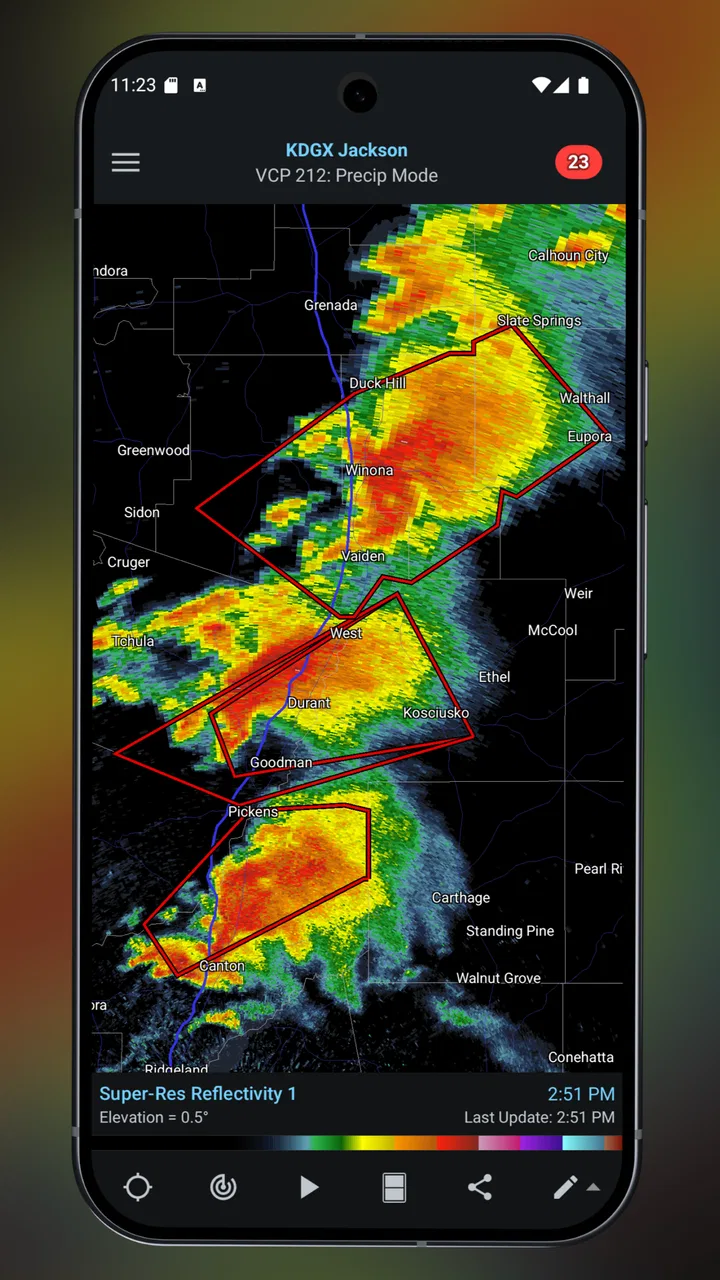
The central idea behind RadarScope is simple but useful: radar is often more valuable than a broad forecast when I need to make a decision in the next few minutes or hours. A normal weather app may tell me that rain is likely, but a radar view can help me judge whether the rain is approaching, already passing, or developing nearby. That distinction is especially helpful when I am deciding whether to start a walk, drive across town, take outdoor equipment inside, or wait before leaving.
You May Also Like

 Blood Strike: 2.5 Anniversary
Blood Strike’s Loadouts Turn Every Drop Into a Tactical Gamble
A close look at Blood Strike’s custom loadouts: how fast access to signature weapons reshapes its battle royale rhythm, rewards preparation, and narrows the gap between fights.

 Pandora - Music & Podcasts
Pandora’s Music Is Easy to Start, but Harder to Recover
Pandora’s strength is its low-effort path from a seed to a station. Its weak spot is how much confidence it asks you to place in connection, setup, and quiet recovery.

 8 Ball Pool
 Is Built on Rivalries, Rematches, and Routine
A close look at the rivalries, rematches, shared routines, and unanswered safety questions that turn a quick pool match into a persistent mobile community.

 Samsung Music
’s Quiet Strength Is Playing What You Already Own
Its reach comes less from spectacle than from dependable access to a personal library. That simplicity is both the app’s strongest retention engine and its ceiling.

 AccuWeather: Weather Radar
AccuWeather Review: A Quick, Clear Forecast for Everyday Decisions
For everyday plans, the best forecast is the one you can understand quickly. AccuWeather makes rain timing, radar, and local conditions easy to act on, with a few trade-offs.

 Hill Climb Racing
Why Hill Climb Racing Still Turns Crashes Into One More Run
A tiny car, a bumpy hill and one more upgrade: Hill Climb Racing keeps resurfacing because its simple chaos makes every near-miss feel personal.
More From Our News Desk



I found the app most convincing when I stopped treating it like a replacement for every weather tool on my phone. It is better understood as a focused instrument. The visual map encourages me to look for patterns rather than rely on a single sentence of forecast text. Once I learned to read the movement of the weather display instead of simply staring at the brightest colors, the app became much more useful.
That learning curve is important. Radar imagery can look dramatic, but dramatic colors do not automatically mean dangerous conditions at my exact location. The display represents weather detected by radar, and interpretation still matters. I use it alongside local alerts and common sense, particularly when conditions are changing quickly. The app gives me a stronger view of the situation, not a guarantee that every part of the storm will behave exactly as the image suggests.
A focused screen instead of a forecast dashboard
Many everyday weather apps compete by placing temperature, hourly forecasts, air quality, sunrise information, widgets, news, and alerts on one screen. That can be convenient, but it also makes the radar feel like one small feature among many. RadarScope takes the opposite route. The radar is the reason to open it, and the rest of the experience supports that purpose.
I appreciate this when I am watching a line of showers approach. I can keep my attention on the map and compare what I see with the direction and timing of the system. I do not have to move through several forecast panels first. That directness is one of the app’s best design decisions, even though it may feel less welcoming to someone who expects a traditional weather home screen.
The focused layout also makes it easier to build a personal routine. I tend to check the radar before a long drive, before planning outdoor work, and when the sky looks unsettled but the forecast has not changed. Those checks are quick once the app is familiar. Instead of asking, “What is the weather today?” I am asking a more precise question: “What is happening around me, and how is it moving?”
How I use it in an ordinary day
Imagine that I have planned a late-afternoon bicycle ride. A general forecast says showers are possible, which is not enough to decide whether to go. I open the app and look at the radar around my route. If the rain is already moving away, I may leave with a light jacket. If a solid band is approaching and appears likely to reach the route soon, I can delay the ride instead of discovering the answer halfway through it.
The same workflow helps with less recreational decisions. Before taking a dog outside, I can check whether a narrow area of rain is about to pass. Before loading tools into a vehicle, I can see whether the dry-looking sky is likely to remain dry. When family members are driving, radar gives me a more practical way to discuss conditions than simply repeating a general forecast.
My tip is to check the display more than once when timing matters. A single radar image is a snapshot, while a sequence gives a better sense of direction and speed. I also avoid making a decision based only on the strongest-looking color. I consider the size of the system, its movement, the route I will actually travel, and whether official warnings apply. That habit is more valuable than any one visual setting.
What it does especially well
I find the app most valuable when I use it to answer a specific question, such as whether rain is moving toward a route or whether a storm is beginning to organize nearby. That focus helps me avoid mistaking an impressive-looking image for a complete forecast. From there, the next section looks at how the radar-first design turns those observations into practical decisions.
It rewards attention to movement
The app’s real strength is not merely showing weather on a map; it is encouraging me to think in terms of movement. A forecast can describe a broad period, but weather radar helps reveal how a system is organized. A scattered collection of showers creates a different practical problem from a continuous line. A small gap may matter if I am walking a short distance, while a large area of precipitation matters more for a long drive.
This is where RadarScope feels more useful than the radar tab hidden inside a general-purpose weather app. The experience is centered on examining the image, not treating radar as a decorative layer. For someone who regularly follows storms, works outdoors, travels through changing weather, or simply wants more control than an icon-based forecast provides, that emphasis is meaningful.
I also like that the app can become part of a layered decision process. I start with the radar, then check official warnings or local information when the situation looks serious. I use the app to understand the broad movement around me, not to replace emergency guidance. That division of labor keeps the tool useful without asking it to answer questions it cannot answer by itself.
A better fit for regional weather watching
RadarScope makes the most sense when weather is variable enough that timing matters. In a place where rain arrives suddenly, thunderstorms are common, or outdoor plans change often, a dedicated radar view can justify its place on the phone. It is also useful for people who already understand basic radar imagery and want a fast way to inspect conditions without the extra content found in larger weather platforms.
For me, the app is particularly effective during transition periods. A calm morning can turn into an uncertain afternoon, and a normal forecast may remain broad while radar shows the change developing nearby. Checking the display at those moments gives me an earlier cue to adjust plans. It does not make the weather predictable, but it helps me react with better information.
There is also a practical advantage for users who dislike noisy weather apps. If advertising, news panels, lifestyle suggestions, or excessive forecast details distract you, the radar-first approach feels refreshingly purposeful. The app does not need to persuade me to browse. I open it with a question, inspect the weather picture, and close it when I have enough information.
Where it beats usual alternatives
A standard free weather app is usually better for a quick glance at the current temperature, a week overview, or a simple hourly plan. Those apps are often easier for the whole household because everyone understands a temperature and a rain symbol. If I am packing for several days or deciding what to wear, I may prefer that broader format.
RadarScope is better when the question is spatial and immediate: which direction is the rain coming from, how widespread is it, and does it appear to be moving toward my location? That is a narrower job, but it performs that job with more purpose than an app that treats radar as one small option.
The comparison is not really “professional app versus bad free app.” It is “specialized view versus general convenience.” I would keep a general weather app for routine forecasts and choose RadarScope when radar interpretation is the important part. Paying for both can be reasonable if weather affects my work or plans, but it is unnecessary for someone who rarely looks beyond the daily forecast.
The limitations I noticed before recommending it
The biggest weakness is the price-to-frequency question. At $9.99, the app asks for a deliberate purchase in a category where many people are accustomed to free options. The optional purchases, which can range from $0.99 to $99.99 per item, make it even more important to understand what kind of user I am before spending money. I see the value if I will use radar regularly, but I would not recommend buying it solely out of curiosity.
The second limitation is that radar does not equal a complete forecast. Someone looking for a polished morning briefing, long-range planning, or a simple answer about what to wear may find the experience incomplete. The app’s professional focus is also its boundary. I would not want a first-time weather user to open it during a stressful situation and assume that the map alone explains every risk.
There is a mental cost as well. Radar can invite overchecking. I can find myself refreshing the map repeatedly for a small shower that does not actually affect my plans. The solution is to define the question before opening the app: am I checking a route, a time window, or a developing system? That keeps the tool practical rather than turning it into a source of unnecessary anxiety.
New users should also give themselves time to become comfortable with the display. The information is more useful once I understand that location, timing, scale, and movement all matter together. I would not judge the app after one glance. At the same time, I would not pretend that every user wants to learn radar. If a simple forecast symbol answers your needs, the extra detail may feel like work rather than value.
Who should choose it, and who should skip it
I recommend RadarScope to outdoor workers, frequent drivers, storm watchers, hikers, cyclists, boaters, event planners, and anyone whose plans depend on short-term weather changes. It is also a good choice for a weather enthusiast who wants a dedicated radar tool rather than a general app with a radar button buried in the interface.
I would be more cautious recommending it to a casual user who checks the weather once each morning. That person may get more from a conventional forecast app that combines current conditions, hourly information, and a longer outlook in a simpler package. Families may also prefer a broader app if different people need different kinds of information from the same screen.
Before buying, I would ask myself three practical questions. Will I check radar at least several times during a typical month? Do I care about the movement of precipitation rather than only the forecast summary? Am I willing to learn enough about radar to interpret it responsibly? If the answer to all three is yes, the purchase is easier to justify. If not, the app may sit unused after the initial novelty fades.
Small habits that make the app more useful
My first habit is to inspect the wider area before zooming tightly into my street. A close view can make a small patch of rain seem more important than it is, while a wider view shows whether the system is isolated or part of something larger. I then narrow the view to the route or place that matters. This two-step approach gives me context without losing local detail.
My second habit is to compare the radar’s movement with the actual time I need to be outside. A storm that looks close may not affect a short errand, while a system farther away may be moving directly toward the route. I avoid treating visual distance as a timetable. I use the sequence of images to form a rough expectation, then leave room for uncertainty.
My third habit is to use the app as an early-warning aid, not as my only source during severe weather. If conditions appear threatening, I move to official alerts and local emergency information. That is not a criticism of the app; it is the responsible way to use any radar display. The app helps me notice and understand change, while official guidance tells me what action is required.
These habits also explain why I think the app is more valuable to an experienced user than to a beginner. The software can put useful information in front of me, but the benefit grows when I ask a specific question and interpret the answer in context. Without that discipline, a detailed radar image can create confidence without understanding.
My final recommendation
RadarScope succeeds because it commits to a clear purpose. It is not trying to be the most entertaining weather app or the easiest source of a weekly forecast. It is a dedicated radar experience for people who want to watch weather develop and make short-term decisions with more context. In my experience, that focus makes it faster and more satisfying than a general app when rain or storms are the main concern.
Its weaknesses are equally clear: the purchase is harder to justify for occasional users, the optional purchases deserve attention, and the radar-first design does not replace a complete everyday forecast. The app also expects me to interpret what I see rather than accept a single simplified answer. That is a strength for the right audience and friction for everyone else.
My recommendation is straightforward: choose RadarScope if weather timing affects your plans, work, or safety decisions, and skip it if you only need a quick temperature and rain chance. I would pair it with a general forecast source and official alerts when necessary. Used that way, it becomes a practical specialist tool rather than an expensive duplicate. For readers who want professional weather radar and are prepared to spend a little time learning how to read it, this is a focused and worthwhile choice.
FAQs for RadarScope
01What is RadarScope, and who is it designed for?
RadarScope is a specialized weather radar app designed for users who want detailed, near-real-time radar data rather than only a simple daily forecast. It is useful for weather enthusiasts, storm chasers, emergency planners, pilots, and anyone monitoring thunderstorms, tornadoes, hurricanes, or heavy precipitation. The interface can feel technical at first, but the radar products provide significantly more detail than many standard weather apps.
02Does RadarScope provide live weather radar and severe weather alerts?
RadarScope displays high-resolution radar imagery from supported weather radar stations, allowing you to track precipitation, storm movement, intensity, velocity, and other meteorological details. Depending on the subscription level and region, it may also include alerts, warnings, storm-tracking tools, and additional radar products. Users should remember that radar data can have delays and that official local authorities remain the most reliable source for emergency instructions.
03Is RadarScope free to download, or does it require a subscription?
RadarScope may be downloaded from the relevant app store, but access to its full feature set can depend on paid options or subscriptions. Basic radar viewing may be available with the standard app, while advanced tools, additional data layers, longer radar archives, lightning information, or professional features may require a recurring plan. Check the current pricing and included features on Google Play or the App Store before subscribing.
04Can RadarScope be used without an internet connection?
RadarScope primarily depends on an internet or mobile-data connection because it retrieves current radar imagery and weather information from online data sources. Previously loaded screens may remain visible temporarily, but the app cannot reliably update radar, warnings, or storm positions while offline. If you expect to travel into an area with limited coverage, download any necessary information beforehand and keep another source of emergency weather alerts available.
05Is RadarScope easy to use for beginners?
RadarScope is powerful, but it is not designed like a basic weather app with simplified icons and short summaries. New users may need time to understand radar reflectivity, velocity products, storm tracks, warning polygons, and map controls. After some practice, the layout becomes more manageable, especially for tracking individual storms. Beginners should learn the main radar modes gradually and avoid interpreting advanced data without consulting trusted weather guidance.
Pros
- Highly detailed radar data for serious weather monitoring.
- Fast updates help track developing storms in near real time.
- Multiple radar products support advanced weather analysis.
- Custom alerts can notify you about nearby severe conditions.
- Works well for storm chasers
- pilots
- and weather enthusiasts.
Cons
- Many advanced features require a paid subscription.
- The interface may feel overwhelming for casual weather users.
- Radar coverage and product availability vary by region.
- It can consume noticeable battery during extended live monitoring.
- Accurate interpretation requires some knowledge of weather radar.

RadarScope
Gallery